kToday I was loading drivers on Windows 10 for a very nice gentleman in New Jersey. When doing this I always ask the question, "Can you verify for me that you don't have any extensions, hubs, adapters connected to your Parallel to USB Cable, because that almost always messes with the bi-directionality that these plotters need."
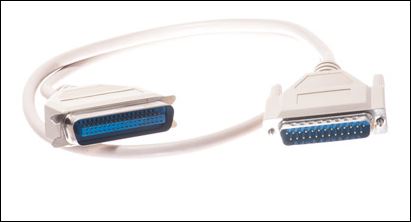
The customer responded, "Well, my USB cable is a USB to DB25 Female Parallel adapter cable connected to the old type of printer cable that is gray and has the twenty-five pin head on both ends."
I told him that it probably would not work. My experience has been that anything connected except for the parallel to usb cable won't work. He explained to me that he had the old gray printer cable but it wasn't long enough to let him reach the plotter that was in the next room from his computer.
I said we'd try it. I was sure it would be for naught. The print came right through...even faster than normal for a Designjet 430. I thanked him and now I'm sharing the info with you! I love these tips. If you want to buy one, it is posted above with the UGREEN label from Amazon, just click on the photo!
The customer responded, "Well, my USB cable is a USB to DB25 Female Parallel adapter cable connected to the old type of printer cable that is gray and has the twenty-five pin head on both ends."
I told him that it probably would not work. My experience has been that anything connected except for the parallel to usb cable won't work. He explained to me that he had the old gray printer cable but it wasn't long enough to let him reach the plotter that was in the next room from his computer.
I said we'd try it. I was sure it would be for naught. The print came right through...even faster than normal for a Designjet 430. I thanked him and now I'm sharing the info with you! I love these tips. If you want to buy one, it is posted above with the UGREEN label from Amazon, just click on the photo!